
Balancing entrance speed with strict access control
Managing event admission requires you to process high volumes of guests quickly without compromising your security standards. When attendees arrive at the gates, they expect a smooth entry process that does not leave them waiting in long queues. At the same time, your access control team must verify that every person holds the correct permissions for the venue. You do not need to sacrifice security for queue speed if you design an event wristband system that supports rapid visual or digital checks.
A well-planned admission workflow reduces friction at the gates by giving staff clear indicators to look for. Event Wristband Info approaches this by highlighting how the right combination of wristband features and operational procedures eliminates bottlenecks. When you equip your team with straightforward checking routines and reliable access credentials, they can process arrivals confidently. This preparation ensures that genuine guests enter without delay while unauthorised access attempts are stopped immediately.
Designing wristbands for split-second visual recognition
The physical design of an event wristband determines how quickly your staff can verify a guest’s access level. If the design is ambiguous or difficult to read, staff must stop every guest to inspect their credentials closely, which creates immediate bottlenecks. You can avoid these delays by creating a layered visual design that communicates permissions instantly. This approach supports your venue managers by giving staff clear, unmistakable visual cues.
Assigning contrasting colors for different zones
Assigning distinct, contrasting colours to different admission types or access zones is the first step in a rapid visual check. High-contrast colours stand out from a distance, allowing staff to identify a guest’s general access level as they approach the gate. You should ensure that the colours you select look clearly different under various lighting conditions, including bright sunlight and dim evening environments. However, colour coding must never be the only method for communicating critical access information, as colour blindness or poor lighting can lead to mistakes.
Adding text and symbols for clarity
To make your access system robust, you must combine your background colours with large, legible text and clear symbols. Printing specific zone names or ticket categories directly onto the event wristband removes any ambiguity for your security team. Symbols offer an additional layer of communication that transcends language barriers and requires only a split second to recognise. This combination ensures that staff can verify permissions correctly even if they struggle to distinguish the background colour.
Using date marks for multi-day events
Multi-day events present an additional challenge because guests often wear the same event wristband for the duration of the festival. Printing the specific valid dates or a large day-of-the-week indicator on the wristband helps staff spot expired credentials instantly. You can also alternate the core design elements or switch colours daily if you use single-day wristbands for a multi-day event. These date marks give your team the confidence to manage re-entry smoothly without relying on memory or complex manual checks.
Using sequential numbering to track issued stock
Sequential numbering gives each event wristband a unique identifier within a printed series. This simple addition helps your access control team monitor venue capacity and track exactly how much stock has been issued at any given time. When staff record the starting and ending numbers at their distribution tables, you gain a clear picture of attendance figures as the event progresses. This objective process of inventory management supports visual checks without slowing down the physical queue at the gates.
Beyond basic counting, unique numbers allow your team to investigate discrepancies effectively. If a guest claims their event wristband was lost or damaged, staff can check the sequential number against the original ticket record to verify the claim. This link between the physical item and the digital registration provides a reliable audit trail. Implementing this numbering system maintains high security standards and gives you complete oversight of your admission process.
Integrating scanning technology for rapid validation
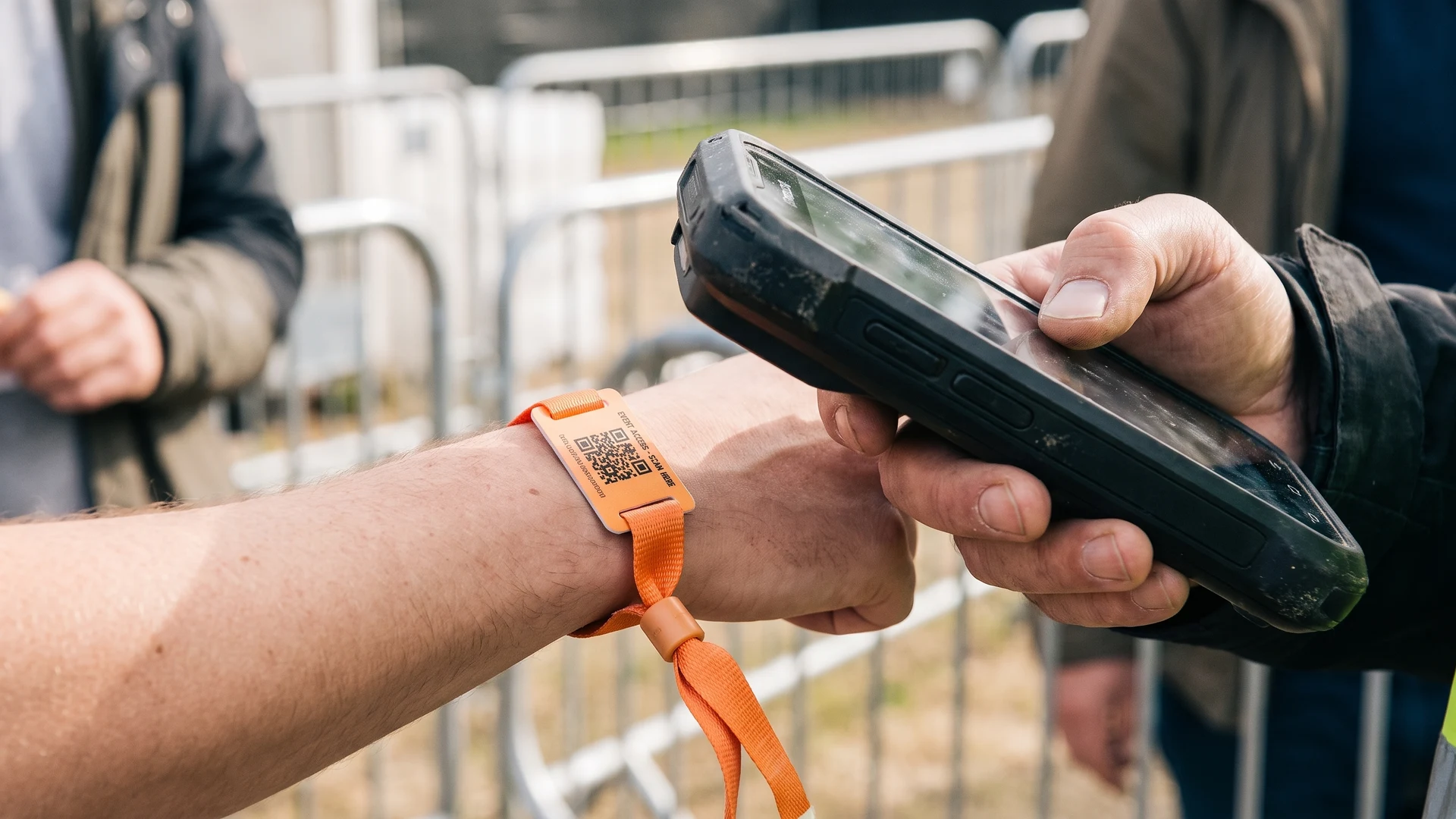
Integrating scanning technology into your access control system replaces slow manual checks with instant optical validation. Handheld scanners read unique digital codes in fractions of a second and cross-reference them with a live database to mark entries as used. This immediate processing stops bottlenecks and prevents duplicate tickets from holding up the line. Event Wristband Info explains these technologies objectively, focusing on how they improve operational speed at the gates.
Printing barcodes for reliable ticket matching
Standard barcodes speed up ticket validation by linking the physical event wristband to your digital ticketing system. When a staff member scans the barcode, the system instantly confirms if the ticket is valid, preventing long arguments over fake or duplicate passes. The physical size and contrast of the barcode must match your scanning distance to ensure the optical sensors register the edges instantly. Printing these codes with high-contrast dark ink on a light background guarantees reliable reads and keeps the entrance flowing.
Using Quick Response codes for faster scanning angles
Quick Response (QR) codes offer a significant advantage over traditional barcodes because scanners can read these two-dimensional codes from any orientation. Staff do not need to flip or align the event wristband perfectly, which saves valuable seconds per guest. However, extreme scanning angles can stretch the square QR code into a distorted shape, causing the camera to lose focus or fail the scan. Holding the scanner directly above the code at a perpendicular angle and flattening the wristband slightly ensures the fastest possible read time.
Preparing the right scanning hardware
To process digital codes efficiently in high-volume crowds, you must deploy the correct scanning hardware and network infrastructure. You can use modern smartphones running recent operating systems with at least an eight-megapixel rear camera for general scanning. For faster, industrial-level processing, dedicated enterprise handhelds with integrated two-dimensional imagers provide the best performance. Your devices also need stable wireless connectivity or local storage caching to validate tickets without lag, even if the venue internet connection drops.
Setting up a fast wristband application process
The speed of your entrance depends heavily on how efficiently your staff issue and apply event wristbands at the distribution tables. If volunteers struggle to separate, fit, or secure the wristbands, queues will build up before guests even reach the main gates. You can prevent this by training your team in a concrete, sequential process that standardises every interaction. Following a clear operational workflow turns general advice into actionable steps for your issuing team.
- Prepare the workspace: Organise the event wristbands into neat, accessible piles on the table before the first guests arrive to avoid fumbling during busy periods.
- Verify the ticket: Scan the guest’s digital ticket or check their printed confirmation to confirm their exact access level and required wristband type.
- Select the correct band: Pick up the specific event wristband that matches the verified ticket, checking the colour and printed text to ensure accuracy.
- Position on the wrist: Ask the guest to hold out their non-dominant hand and wrap the wristband comfortably around their wrist, leaving enough space for two fingers to fit underneath.
- Secure the closure: Fasten the adhesive tab, plastic snap, or fabric lock firmly, ensuring the wristband cannot slide over the guest’s hand without breaking.
- Confirm the application: Give the wristband a gentle tug to verify the closure is secure and direct the guest towards the appropriate entry gate.
Training staff to execute rapid visual checks
Once guests wear their event wristbands, your security team must evaluate them quickly as people walk through the entrance. Without a consistent inspection routine, staff may miss important details or cause unnecessary admission delays by stopping every person for too long. Empowering your team with a structured visual check ensures they spot issues rapidly while maintaining a steady flow of foot traffic. This practical guidance builds confidence in staff handling high-volume admission zones where every second matters.
- Observe the approach: Look at the guest’s wrist as they walk towards the gate to identify the primary background colour of the event wristband from a distance.
- Check for visibility: Ask guests to raise their hands or pull back their sleeves if the wristband is hidden by clothing or accessories.
- Verify the specific markings: Read the printed text, symbols, or date marks to confirm the guest has the correct permissions for that specific day and zone.
- Inspect the closure: Glance at the adhesive area or locking mechanism to ensure it sits flat against the wrist and shows no obvious signs of tampering.
- Assess the fit: Notice if the event wristband appears suspiciously loose, which may indicate that someone stretched it to transfer it to another person.
- Wave valid guests through: Acknowledge the correct wristband clearly and direct the guest into the venue immediately to keep the line moving.
Managing doubtful cases without blocking entrances
Security staff will inevitably encounter damaged, tampered, or suspect event wristbands that require a closer look. They must know how to identify signs of tampering, such as ripped adhesive ends, hidden clear tape, or plastic snap closures with pry marks. A wristband that slides easily off the hand or sits on the dominant wrist often indicates an unauthorised transfer attempt. While these closures show clear signs of tampering, your staff need a safe procedure to manage these instances without holding up valid guests.
The most effective strategy for handling doubtful cases is to route flagged attendees away from the primary entry lanes and into a secondary inspection area. This separation keeps the main flow moving while giving security workers extra time to perform detailed screenings or verify purchase records. If an event wristband is genuinely damaged or heavily altered, supervisors in this off-line area can resolve the issue, invalidate the credential, or require a paid replacement. Applying this realistic security expectation prevents a single problematic check from stalling the entire queue.
Reconciling wristband inventory after the event
When the gates finally close, you must reconcile your event wristband inventory to capture valuable operational data. Your team should count all unused stock, record any damaged or voided bands, and compare these totals against your initial ticket sales. Reviewing this entrance performance helps you identify where shortages occurred or which distribution tables worked most efficiently. Closing the loop on your access control system ensures you have accurate records and practical insights to prepare for your next successful event.
How do event wristbands speed up entry without weakening access control?
They provide quick visual cues and fast scans. Use colour plus printed text and numbering to confirm category and day. Barcode or Quick Response code scans take under a second and mark entries used. Route flagged guests to a secondary check to keep lanes moving.
What should we print on a wristband so staff can recognise permissions fast?
Combine a clear base colour with readable text for ticket type, day or zone. Add sequential numbering to connect each event wristband with a record. If you use codes, print a high contrast Quick Response code and a human readable fallback like a short identification code.
How do we set up Quick Response code wristbands for high volume scanning?
Use high contrast artwork and size the code so the scan distance is roughly ten times the code width. Choose higher error correction to tolerate minor damage. Print on matte material to avoid glare. Train staff to hold scanners close and perpendicular. Provide fast local processing when networks slow.
What scanning hardware works best at busy gates?
Recent smartphones, tablets, or dedicated handheld scanners all work when set up correctly. Use devices with a fast rear camera, current operating system, and reliable wireless or cellular connectivity. Enable offline caching for outages, carry spare batteries, and use rugged cases outdoors or in high volume conditions.
How should our team handle doubtful or tampered wristbands without blocking the queue?
Redirect the guest to a marked secondary inspection area and keep the main lane moving. Perform visual checks for tears, retaping, or loose closures. Verify records with a supervisor before re-entry. Cut off clearly tampered wristbands and log the incident. Event Wristband Info offers neutral checklists you can adapt.