Integrating event wristbands with emergency procedures
Event wristbands do much more than control basic admission at the main gates of your venue. When you face an unexpected incident, these identifiers help your team manage crowd movement and enforce necessary restrictions. Your staff can quickly assess who belongs in a specific area by looking at the physical wristband material and its printed features. This immediate visual check prevents unauthorised access to sensitive zones during an emergency response.
Integrating event wristbands into your broader safety procedures gives your team a practical advantage. You can assign specific wristband designs to different access levels, which allows security personnel to identify vulnerable groups or priority staff at a glance. Event Wristband Info provides objective guides to help you understand how different materials and closures support these operational goals. Planning these details in advance ensures your team responds confidently when situations change rapidly.
Connecting zone permissions with occupancy data
Connecting your wristband system to occupancy tracking helps you prevent overcrowding in specific restricted areas. When staff monitor access points carefully, they gather valuable data that supports safe crowd density across the entire venue. You can use this operational information to direct resources where they are needed most.
Tracking access limits in restricted areas
Staff must enforce capacity limits in VIP areas, backstage zones, and production spaces to maintain safety. By checking the specific event wristband required for each zone, your team controls exactly how many people enter and exit. This continuous monitoring ensures that restricted areas never exceed their safe operational capacity.
Monitoring crowd density throughout the venue
Keeping track of crowd density helps you identify potential bottlenecks before they become dangerous. If your event uses technology like barcodes or scanning devices, staff can record entries and exits at various checkpoints. This constant flow of data gives venue managers a clear picture of where attendees are congregating at any given moment. You can then redirect foot traffic to quieter areas to balance the crowd load.
Linking capacity data to incident management
Accurate capacity data becomes a critical resource when you need to activate incident reporting tools. If a specific zone requires partial closure, knowing the exact number of people inside helps security teams scale their response appropriately. Sharing this occupancy information with emergency responders allows them to plan their actions based on real numbers rather than estimates. This structured approach directly supports safe crowd management and clear communication.
How to brief your team on wristband safety protocols
Training your staff effectively ensures they know exactly what to look for on a wristband under high-pressure conditions. A concrete sequence of steps gives volunteer coordinators and security teams a clear framework for their briefings. You must ensure every team member understands how to inspect event wristbands and act on that information during an evacuation or incident.
- Visual inspection: Train your team to check the wristband colour, material, and closure method first. This initial scan helps them confirm that the attendee holds a valid identifier for the current day and access zone. Staff should practice this step until they can perform it quickly without delaying the crowd.
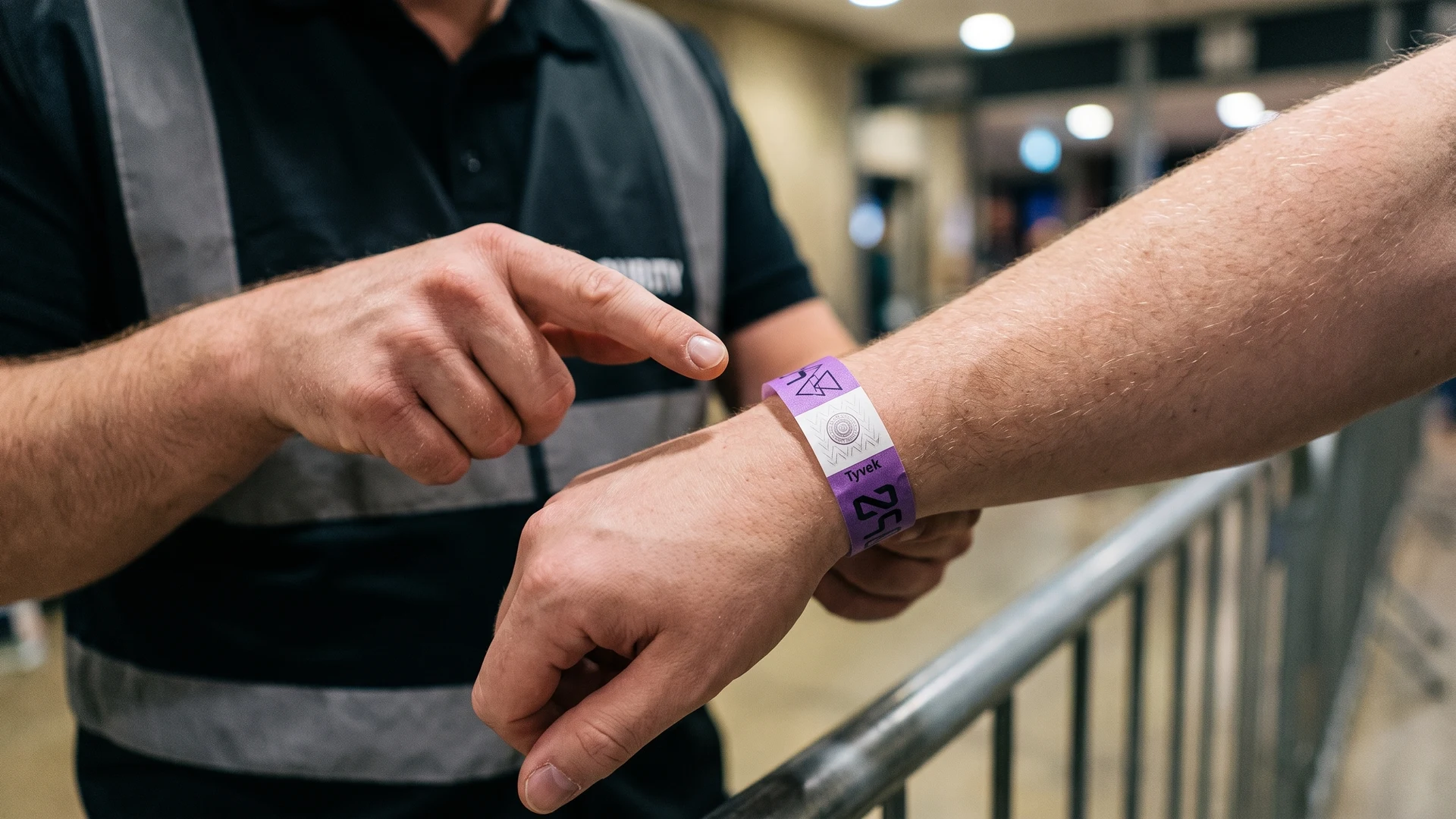
- Reading printed identifiers: Instruct staff to read any specific printed text or symbols on the wristband. Colour coding alone is never enough to communicate critical access or safety information, so these additional markers become vital during chaotic situations. Recognizing these details quickly prevents routing errors when normal pathways are blocked.
- Applying emergency routing: Teach your personnel how to direct specific groups based on their wristband type during an incident. Clear instructions ensure that attendees are guided to the correct assembly points without unnecessary confusion. Staff must know exactly which exits correspond to the different access zones marked on the wristbands.
- Reporting discrepancies: Outline the exact process for reporting tampered or incorrect event wristbands to the security manager. Quick communication about access issues helps the broader team maintain control over restricted areas. You must provide a clear chain of command so staff know who to contact when they spot a problem.
Recording sequential numbering for quick incident response
Sequential numbering gives each event wristband a unique number within a defined series. Logging these number ranges at key entry points provides a straightforward administrative method to track specific groups of attendees. This simple low-tech feature helps operators maintain control without relying on complex technology that might fail during a power outage. Staff can quickly check a wristband number against the entry log to verify when and where a guest arrived.
You can use these recorded number ranges to locate missing attendee groups or manage entry zones during partial closures. If a specific section of your venue becomes unsafe, security teams can identify who was assigned to that area based on their numbered wristbands. This administrative practice reinforces the need for clear staff procedures over automated systems. Reconciling this data ensures your team can account for guests accurately during an incident response.
Using wristband identifiers during an evacuation
When normal access flows are disrupted, specific printed text and symbols on the wristband help your staff identify and route guests correctly. Designing event wristbands with clear readable markers ensures your team does not have to rely solely on colour coding during chaotic situations. You must prioritise visibility so that instructions remain clear even in poor lighting or high-stress environments.
Adding printed access text for clarity
Printing clear access text directly onto the wristband removes any ambiguity for your staff. Words like ‘General Admission’, ‘Backstage’, or ‘Family Zone’ provide immediate instructions that anyone can understand without referencing a manual. This straightforward text is especially important because colour coding alone cannot communicate critical safety information reliably. During an evacuation, readable text helps volunteers direct attendees to the right exits immediately.
Using physical symbols to designate zones
Physical symbols offer another layer of visual identification that transcends language barriers during an emergency. You can print large geometric shapes or distinct icons on the event wristband to represent different assembly areas. When an incident occurs, staff can simply instruct guests to follow the signs that match the symbol on their wrist. This visual matching process speeds up movement and keeps distinct groups together safely.
Routing groups safely using clear identifiers
Routing attendees during an evacuation requires decisive action and unmistakable visual cues. By combining text, symbols, and distinct materials, you give your team multiple ways to verify a guest’s designated zone. Staff can quickly separate vulnerable groups, such as school children, from general admission crowds by checking these identifiers. This organized approach prevents bottlenecks and ensures everyone reaches their designated safety point efficiently.
Reviewing your event wristband strategy after the event
After the crowds have departed, you must reconcile your event wristband data and staff feedback with official incident reports. Reviewing this information helps you evaluate what worked well and what needs adjustment for your next project. Event Wristband Info always recommends adopting a continuous improvement mindset to refine your crowd management plans over time. Taking the time to assess these details ensures your future safety procedures become even more effective.
How do I set up wristband numbering so zones can be audited quickly?
Start with sequential numbers and assign defined number blocks to each zone or entry point. Record the block, location, and time in a simple log before distribution. At checkpoints, staff note the number ranges present. Reconcile against unused stock and reported movements.
What should I print on event wristbands to support evacuations?
Include a large zone code, a clear role label for staff, and a unique sequential number. Use high contrast colours plus readable text or symbols to avoid confusion. Add the event day or date if relevant. If you add a code, keep a human readable version.
How should my team use wristbands during a partial closure?
Give a simple three step check at controlled points. First confirm the zone code or role label matches the access list. Second confirm the number sits within the permitted range. Third check the closure is intact. Escalate mismatches to the named supervisor.
How do I link wristband checks to my incident reporting?
Add fields for zone, role, wristband number range, checkpoint, time, and action taken. Train staff to write the range or scan a barcode or Quick Response code if present. Note who authorised any override. Use the same codes in radio calls and logs.
What is my fallback if RFID or NFC readers stop working?
Switch to visible print and manual number logging immediately. Radio Frequency Identification wristbands and Near Field Communication wristbands rely on readers and power, so prepare a paper range sheet for each zone. Tally entries and exits with hand counters. Announce the switch in your incident log and brief leaders.