
Balancing wristband information with backend database security
An event wristband serves as a physical token that connects a guest to their specific access permissions. Rather than printing personal details like names or phone numbers on the material, you can use generic visual markers or unique digital codes. This separation ensures that anyone looking at the wristband only sees basic entry rights rather than private data. Your team can then manage all the sensitive details securely within your main event management software.
Minimising the data carried on the wristband also makes your overall event operations much more resilient. If a guest loses their event wristband, they only lose a physical identifier rather than a document full of personal information. Your staff can easily cancel the lost identifier in the database and issue a replacement without risking a privacy breach. This approach builds confidence for both your attendees and the security personnel managing your entrances.
Visual identifiers versus encoded digital data
Choosing how to display information on an event wristband directly impacts how your staff manage queues and restricted zones. You can rely on visual elements that personnel check by sight or use digital identifiers that require dedicated scanning hardware. Understanding the practical differences helps you select the right method for each access point at your venue.
Visible features for quick checks
Visual features include the physical wristband material, its colour, and any printed text or symbols. These elements allow your security staff to verify general admission or zone access instantly as guests walk past. Because visual checks do not require scanning equipment, they keep large crowds moving quickly through busy main entrances. You should combine colours with printed text to ensure that access permissions remain clear even in poor lighting conditions.
Machine-readable codes
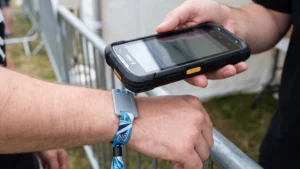
Machine-readable options like printed barcodes or Quick Response (QR) codes add a layer of digital validation to the physical wristband. Staff must use handheld scanners or stationary readers to scan the code, which then checks the guest’s status in your central database. This method prevents people from sharing visual wristbands because the system logs each scan and flags duplicate entry attempts. While scanning takes slightly longer than a visual check, it provides accurate attendance tracking and stronger security for restricted areas.
Radio Frequency Identification chips
Radio Frequency Identification (RFID) wristbands contain a small embedded microchip and antenna that communicate wirelessly with compatible readers. When a guest taps their wristband against a reader, the system retrieves a unique identifier code and verifies it against your secure backend database. This technology supports complex operations like cashless payments and multi-zone access control without requiring a direct line of sight for scanning. Implementing this digital identifier requires reliable hardware, software, and staff training to ensure smooth operations throughout the event.
Managing basic access control without printing personal names
Simple visual tools offer a highly effective way to validate access without exposing personal guest information to the public. You can assign different wristband colours to specific ticket categories, days, or restricted zones. This visual approach lets your staff recognise permissions instantly without needing to read a printed name or scan a digital code. Keeping the design generic speeds up the entry process while maintaining complete privacy for your attendees.
However, colour coding should not be the only method you use to communicate critical access information. You can improve security and clarity by adding custom printing, such as bold text, specific symbols, or sequential numbering. Sequential numbering gives each event wristband a unique number within a defined series, helping your team track stock and investigate discrepancies. Combining a distinctive colour with clear printed indicators gives staff a reliable system to follow while keeping personal details safely stored in your database.
Handling age verification without exposing sensitive details
Food and beverage managers need a reliable way to identify adult guests quickly without compromising personal privacy. Printing dates of birth or identification numbers directly on the physical wristband creates unnecessary data risks. Instead, your team can use several alternative methods to confirm age status efficiently at the bar.
Dedicated age verification wristbands
The simplest approach involves issuing a separate, dedicated event wristband exclusively for age verification. Security staff check the guest’s physical identification document once at a designated station and apply a specific brightly coloured wristband. Bar staff then only need to look for this specific visual marker before serving restricted items. This method removes the need to store or transmit any personal data during the event.
Combining admission and age status
If you want to reduce the number of wristbands each guest wears, you can combine admission and age verification into a single physical item. After checking a guest’s age at the main entrance, staff can issue a specific wristband design that visually confirms both their ticket type and their adult status. This streamlined process requires careful coordination at the gates to ensure staff apply the correct variation to each attendee. It keeps queues moving steadily while providing a clear visual signal to your food and beverage teams.
Backend age flags linked to scans
For events using digital scanning, you can securely link a guest’s age status to their unique digital identifier. When a guest registers and verifies their age, the system updates their profile in your central database with an adult flag. When bar staff scan the barcode or RFID wristband, the reader simply displays a green light or approval message rather than showing the actual date of birth. This setup protects sensitive details entirely within the software while giving staff immediate, accurate verification.
Linking wristband identifiers to your registration database
Connecting a physical event wristband to a guest’s digital registration record requires a clear technical workflow at the entrance. This process binds a unique identifier on the wristband to the secure profile stored in your event database. Your team can establish this connection securely by following a standard integration process.
- Ticket scanning: The attendee arrives at the gate and presents their pre-registered ticket barcode or confirmation number to the entry staff. The entry system scans this token and searches the central event database to locate the matching digital profile. This initial step confirms the guest has a valid registration before any physical hardware is issued.
- Identifier assignment: Staff take a blank or unassigned RFID wristband and tap it against a dedicated desktop encoder. This action instantly binds the microchip’s unique identifier to the attendee’s database record in real time. The physical event wristband now acts as a secure key to access that specific digital profile.
- Secure transmission: The local scanning device communicates with the main database using a secure Application Programming Interface (API). This secure connection encrypts all data during transit to ensure that personally identifiable information remains protected from unauthorised interception. Using robust encryption is critical for complying with data protection regulations and preventing fraud.
- Instant validation: When the system receives the unique identifier, it queries the central database to confirm the guest’s specific access rights. The software validates the ticket category, checks zone permissions, and automatically logs the exact check-in timestamp. Once validated, the system sends an immediate approval signal back to the reader at the gate.
- Cloud syncing: The entry device immediately pushes the updated check-in status to the central server in the cloud. This real-time synchronisation ensures that all other scanning devices across the venue recognise the guest as already admitted. It effectively prevents anyone from passing the wristband back to another person for a duplicate entry.
Securing cashless payments with cloud-based balances
A cloud-based cashless payment system uses the event wristband strictly as a secure reference point rather than storing actual money on the physical material. When a guest makes a purchase, the point-of-sale terminal captures the unique identifier from the wristband and sends it to your cloud database. The central server looks up the linked digital wallet, verifies the available balance, and authorises the transaction in real time. Keeping financial data in the backend database prevents anyone from skimming personal details directly from the microchip.
Storing balances in the cloud also protects your attendees if their physical wristband becomes lost or damaged during the event. Because the funds remain securely attached to their digital profile, your team can easily deactivate the missing unique identifier. You can then issue a new event wristband and link it to the same backend account without the guest losing any money. This centralised approach ensures accurate real-time analytics for your vendors while maintaining the highest level of security for financial transactions.
Mitigating risks when an event wristband is lost
Handling a misplaced wristband during a multi-day event becomes a straightforward process when you separate physical hardware from digital records. Because the event wristband only carries generic visual markers or a secure digital identifier, a lost band reveals no personal guest data to whoever finds it. Your staff can simply void the old identifier in your database, rendering it completely useless for access or payments. They can then issue a replacement wristband, ensuring the guest continues to enjoy the event with minimal disruption and zero privacy risk.
Establishing a clear data policy for your event
Creating a successful data policy means keeping information minimal on the wristband and securely stored in your backend software. You should define exactly what visual identifiers staff need for quick checks and what data requires encrypted digital validation. Event Wristband Info provides objective resources to help you understand these options and formalise your operational procedures. By planning these workflows carefully, your team will deliver a seamless experience for guests while maintaining strict control over venue security and personal privacy.
What should I print on the event wristband?
Print only what staff must read at a glance. Include the event name or day, the access category or zone, any required age mark, and a unique serial number or Quick Response code (QR code). Avoid names, full birthdates, or contact details. Keep fonts high contrast and simple.
What should I encode on an RFID wristband chip?
Store only a Unique Identifier on the Radio Frequency Identification (RFID) wristband chip. Do not encode names, dates of birth, or payment details. Link that identifier to the guest profile in your system through a secure Application Programming Interface (API). You can pre-encode identifiers or pair blank chips at check-in.
How do I link a wristband to a guest profile at check-in?
At check-in, scan the ticket, then assign the wristband by tapping it to an encoder. The system binds the chip’s Unique Identifier (UID) to the attendee record. When the guest taps a reader, the UID is looked up in the database to validate entry and permissions. This updates logs instantly.
How do we prove age without storing a birthdate on the wristband?
Verify age once during issuance, then record only an age status. Print a clear 18+ or 21+ mark plus text or a symbol, and avoid relying on colour alone. In the backend, store the date of birth and apply permissions for alcohol or restricted areas. Train staff on the check.
How do cashless payments work without storing card data on the wristband?
Payments run through a cloud account linked to the wristband identifier. At the point of sale, the terminal checks the balance or a linked card and approves in real time. No card data lives on the wristband. For outages, consider encrypted offline logs that sync later.