
Why aligning event wristband data with your systems matters
Balancing physical wristband information with your database records ensures smooth access control across your entire venue. When guests arrive at the gates, your staff need clear and immediate confirmation that the person belongs in that specific area. A well-planned data structure connects the visible elements on the event wristband directly to the digital permissions held in your system. This alignment stops confusion at the entrance and allows your team to process arrivals quickly and accurately.
Without a clear link between the physical item and the digital record, you risk creating long queues and frustrating delays for your attendees. Staff members forced to guess or manually look up vague information cannot manage crowd flow effectively during busy periods. Structuring your data properly means every scan or visual check provides an instant, reliable answer about guest permissions. This preparation ultimately protects your event timeline and keeps the focus on providing a welcoming experience.
Deciding what information to print on the physical wristband
Categorising your event data correctly helps you decide what needs to be visible immediately on the wristband versus what should remain securely in your database. You must balance the need for fast manual checks by staff with the requirement to keep sensitive guest information private.
Essential visual indicators
Certain pieces of information must be instantly readable without relying on scanning hardware or software. Printing clear text, symbols, or access dates allows your team to verify entry rights at a glance in busy environments. These visual cues speed up processing for staff who are managing fast-moving queues or dimly lit access zones. You should limit these printed details to broad categories like admission type, age verification, or specific VIP areas.
Connecting wristbands to digital records
The physical wristband material acts as a carrier for the identifiers that link directly to your central system. Instead of crowding the band with complex schedules, you simply print a unique number or scan code that points to the digital profile. When a member of staff checks this identifier, the system instantly retrieves the relevant access levels and ticket types. This approach keeps the wristband uncluttered while providing your team with access to a wealth of operational data behind the scenes.
Protecting sensitive guest data
You should never print personal medical details, credit card numbers, or full names directly onto the physical wristband. Exposing this information creates significant privacy risks if a guest loses their band or if someone else reads it. Keeping sensitive data safely in the database ensures that only authorised staff with the right scanning tools can view it. This separation protects your attendees and ensures your event complies with standard data privacy principles.
Connecting wristbands to your database with identifiers
Different identifiers work with your hardware and software to validate entry or access cashless funds. Choosing the right method involves differentiating the physical event wristband material from the specific technology attached to it.
Scanning printed barcodes and Quick Response codes
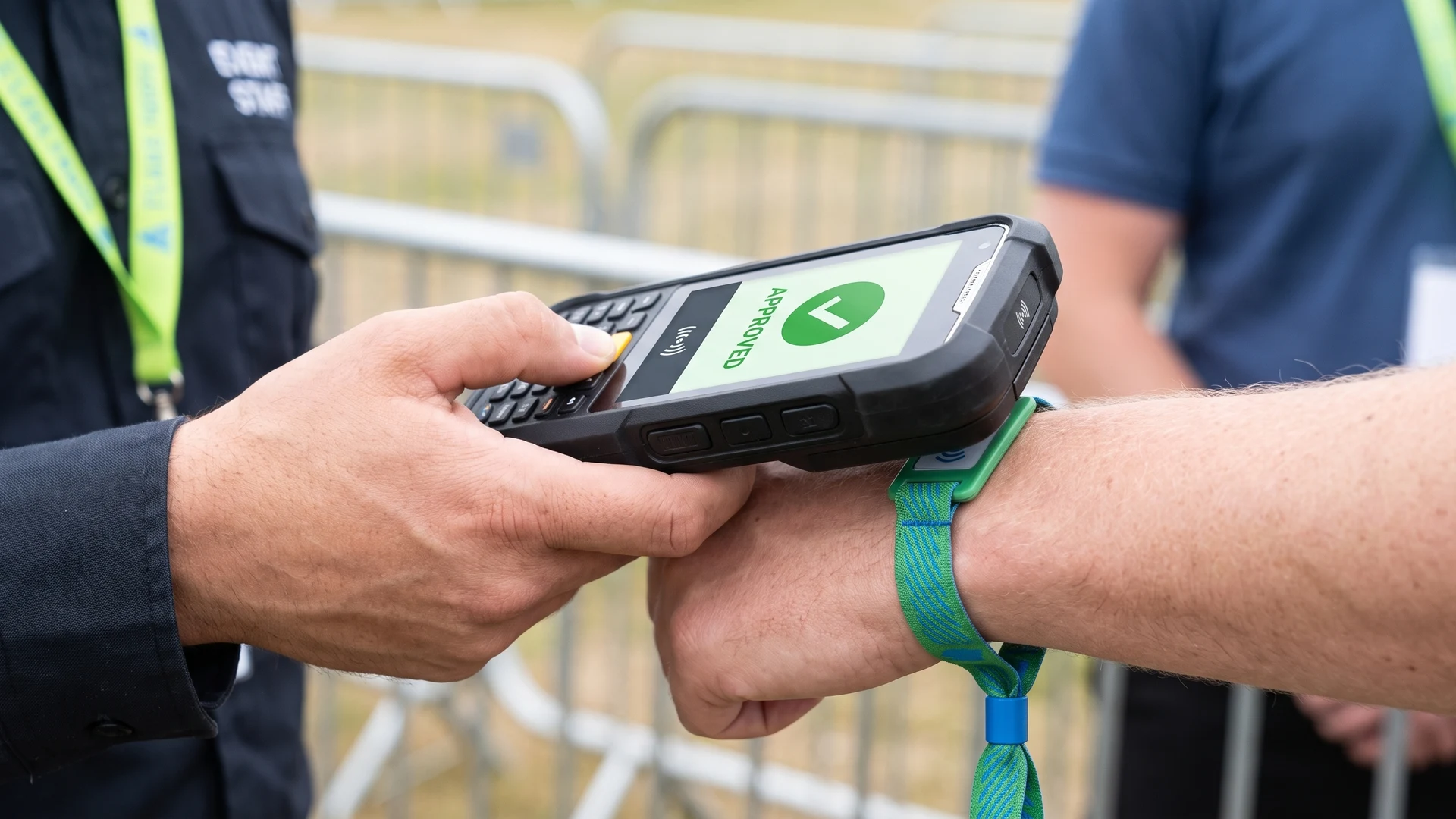
A barcode or Quick Response code links a physical wristband to an event database by acting as a unique visual key that corresponds to a specific guest record. During manufacturing, a special printer applies a unique linear barcode or two-dimensional Quick Response code onto each band. When a staff member points a scanner or smartphone at the wristband, the device reads the pattern and sends the unique identifier string to the central database. The database instantly checks if the code is valid and returns an approved or denied message within a fraction of a second.
These printed codes do not store personal itineraries or payment details themselves. They simply act as a pointer to the secure database where the organiser maps the exact identification number to the attendee profile. Because the code connects to a live system, your team can easily update a guest record to mark a ticket as redeemed. This dynamic connection also allows you to instantly deactivate a lost wristband or upgrade permissions remotely.
Using Radio Frequency Identification chips
Radio Frequency Identification chips use non-volatile microchips to store unique identifiers and transmit that data to a reader for access control. The stationary reader continuously broadcasts a low-power radio wave that creates a small electromagnetic field around the access point. When a guest holds their passive event wristband near the reader, the embedded antenna captures the energy to power the microchip instantly. The activated chip then reflects a modified signal back to the reader, which decodes the identifier and forwards it to the database to grant entry.
Applying Near Field Communication for guest interaction
Near Field Communication is a specialised, high-frequency subset of Radio Frequency Identification technology that requires a much shorter communication range of under four centimetres. While traditional systems often rely on one-way communication, Near Field Communication supports secure two-way data exchange between the event wristband and the reader. This technology integrates advanced encryption directly into the connection, making it safe for processing cashless payments at food and merchandise stands. Attendees can also tap their enabled wristbands against designated points to share contact details, download guides, or trigger interactive exhibits.
Structuring different types of event permissions
Planning a clear hierarchy of permissions tied to an event wristband helps your team manage access systematically. Moving from basic venue entry to specific zone access ensures that staff can easily determine who is allowed in different areas.
- General admission: This foundational permission level grants access to the main public areas of your venue while restricting entry to backstage or premium zones.
- Age verification: This category clearly identifies attendees who are legally permitted to purchase alcohol or enter age-restricted areas.
- Restricted zone access: This level applies to specific locations such as VIP lounges, production offices, or media tents where only authorised guests and working staff belong.
- Cashless payment rights: This digital permission connects the event wristband to a pre-loaded wallet or credit card profile for purchasing food and merchandise securely.
- Multi-day re-entry: This status allows festival attendees or weekend ticket holders to leave and return to the venue across several days without losing their validity.
Using colours and text to support your data structure
While your central systems hold complex digital data, your staff still require clear visual cues for fast manual checks. You can assign a different wristband colour to each access level to help gate teams recognise permissions from a distance. However, colour coding alone is not sufficient for communicating critical access or safety information. Varying light conditions, colour blindness, and similar shades can cause staff to misread permissions if they rely entirely on visual hues.
To build a reliable system, you must combine colour coding with text, symbols, or sequential numbering. Printing the specific day, access zone, or ticket category directly onto the event wristband ensures that staff have a secondary method to verify entry. This combination speeds up processing and reduces access mistakes by giving your team a consistent verification process to follow. Using multiple visual indicators creates a safer environment where everyone understands exactly who belongs in each area.
Keeping scanners and software in sync during the event
Venue internet connections often fail or slow down when thousands of attendees gather and connect to local cell towers at the same time. Mobile access control scanners manage these network outages by using local data caching to authenticate credentials autonomously. Before the gates open, the scanning devices download active user credentials, permission lists, and access rules into their internal memory. When a guest presents an event wristband during an outage, the device checks the local cache to unlock the entry point without waiting for a cloud server response.
To prevent double entry when operating offline, ticketing systems rely on local data synchronization and device partitioning. Organisers divide the guest list by assigning specific blocks of barcodes to specific gates so a ticket cannot be passed over a fence and scanned elsewhere. Once the network connection is restored, the scanner enters a store-and-forward mode to upload its cached activity logs back to the central management system. The device safely queues the data locally and resolves any mismatches to ensure all ticket and payment records remain accurate.
Steps to align your wristband records before opening the doors
You must test your physical event wristbands against the software database prior to the event to ensure the planned data structure actually works. Following a sequential process guarantees that your staff have simple checking procedures when guests finally arrive.
- Map the access zones: Review your venue layout and define exactly which digital permissions and physical identifiers are required for every entrance, VIP area, and staff zone.
- Import the database lists: Load your final attendee records, ticket types, and access hierarchies into the central management software so every profile is ready for connection.
- Test the physical identifiers: Scan a sample of your printed barcodes or tap your chip-enabled event wristbands against the readers to confirm the system recognises them instantly.
- Verify offline capabilities: Disconnect your scanning devices from the internet and scan test wristbands to ensure local caching works properly during simulated network outages.
- Train your ground staff: Instruct your team on how to read visual cues, operate the scanning hardware, and handle situations where a wristband fails to scan.
Reviewing your event wristband data after the final guest leaves
Reconciling your physical wristband stock and digital entry records post-event provides valuable insights for your next gathering. By comparing the number of scanned event wristbands against the remaining unused inventory, your team can identify discrepancies and evaluate attendance accuracy. Event Wristband Info provides educational resources to help you use this captured access and payment data to understand crowd flow and review your security setups. This objective review allows organisers to improve future layouts, refine staffing allocations, and build more efficient access control systems.
What information belongs on the wristband and what stays in the database?
Put only fast-to-read cues and a scannable identifier on the event wristband. Keep names, contact details, payment methods, and full permissions in your database. Link the two with a unique identifier (ID) or code. Add sequential numbering for stock control, plus clear zone or day text, not colour alone.
How should I choose a wristband identifier for scanning?
Choose based on range, speed, and device compatibility. Barcodes and Quick Response codes scan with cameras and are low cost. Radio Frequency Identification (RFID) supports fast tap access with dedicated readers. Near Field Communication (NFC) enables smartphone taps and secure payments. Wristband material and technology are separate choices.
How does a scannable code on a wristband connect to our system?
A scannable code holds a short unique identifier (ID) that points to a guest record in your system. During printing, each wristband receives that ID. When staff scan it, the app sends the ID to your server for approval and redemption. You can update permissions centrally without replacing the wristband.
What should we plan for when scanners lose internet during check in?
Plan for offline validation so queues keep moving. Before gates open, sync active tickets and permissions to every scanner. During an outage, devices verify locally and save time-stamped logs. When the network returns, they upload records to the server. A local Wi-Fi network can support on-site syncing.
How do we reduce double entry when gates run offline?
Combine several safeguards when gates run offline. Partition the guest list by entrance so a ticket validates only at its assigned gate. Use time-based one-time passwords (TOTP) or digitally signed barcodes the scanner can verify without the internet. Enable local mesh or on-site Wi-Fi to share used-ticket updates.