Preparing your front line staff for event wristband checks
Preparing your team for event wristband checks is a vital step in maintaining smooth operations at busy gates, restricted zones, and bars. When staff know exactly what to look for, they can process guests quickly while confidently spotting discrepancies. A well-prepared team reduces entry bottlenecks and ensures that only authorised attendees access specific areas. As an educational resource, Event Wristband Info provides practical guidance to help you equip your staff with the knowledge they need to manage access control efficiently.
Key features staff must inspect on an event wristband
Staff must verify multiple physical and visual elements of an event wristband beyond just its colour. Colour coding helps with quick visual checks, but it should not be the only method used for critical access or safety information. Front line workers need to understand the materials, closures, and printed details to ensure a wristband is valid and securely attached.
Checking the physical closure for tampering
Your team should always inspect the physical closure to confirm the event wristband has not been loosened or reattached. For plastic snap locks, staff must check that the one-time snap is fully locked and look for stressed, cracked, or warped plastic around the teeth. When using Tyvek wristbands, workers need to look for torn or shredded security die-cuts on the adhesive strip, which indicate someone tried to peel it open.
Staff should also perform visual and physical checks on fabric closures to detect tampering. Workers should ensure sliding barrel clasps are pushed tight against the wrist with no slack left in the band. If they spot fuzz or fraying on the material immediately next to the barrel lock, it often means someone tried to force the fabric backward through the internal teeth. Staff can perform a gentle tug test on the locking bead, and if it slides even a fraction of a millimetre, the internal teeth are compromised.
Reading printed access details and identifiers
Printed access details and identifiers are crucial for verifying that a guest holds the correct permissions for a specific area. Colour assigns a distinct visual cue, but staff must also read bold text labels like VIP, Staff, or Press printed in large fonts to confirm access tiers. Icons or specific zone labels further help limit entry to exact locations and eliminate confusion.
Sequential numbering and scannable identifiers connect the physical material to a digital record. Serial numbers use unique digits to track individual credentials and help staff spot duplicate copies at the gate. If your event uses digital scanning, workers will read barcodes, Quick Response (QR) codes, or embedded smart technologies like Radio Frequency Identification (RFID) or Near Field Communication (NFC) chips to instantly verify an individual’s database profile.
Spotting secondary security features
Secondary security features add an extra layer of verification to protect high-value access zones. Holographic printing and foil stamps create shiny, hard-to-copy designs that help staff quickly verify that the pass is genuine. If your team is operating in low-light environments, they can use ultraviolet light to reveal hidden patterns printed with UV ink. Training staff to recognise these specific visual markers ensures they can confidently identify authentic event wristbands and prevent unauthorised access.
How to run an effective briefing for security and volunteers
Conducting a structured pre-shift briefing ensures your security personnel and volunteers understand the exact access rules before the event begins. A clear sequential process gives everyone a chance to familiarise themselves with the event wristbands and ask questions. You can follow these concrete steps to train your staff efficiently and align your team on the inspection process.
- Show physical examples: Distribute physical samples of every valid event wristband type so staff can feel the material and inspect the closures closely.
- Explain access rules: Detail exactly which colours, text labels, and technologies correspond to specific entry gates, VIP zones, and age-verified bars.
- Demonstrate inspection techniques: Show volunteers and security teams how to perform visual checks and gentle pull tests without making guests feel uncomfortable.
- Practice issue resolution: Run through a quick scenario where an event wristband appears damaged or invalid, allowing staff to practice their response safely.
Building visual reference boards for fast decisions
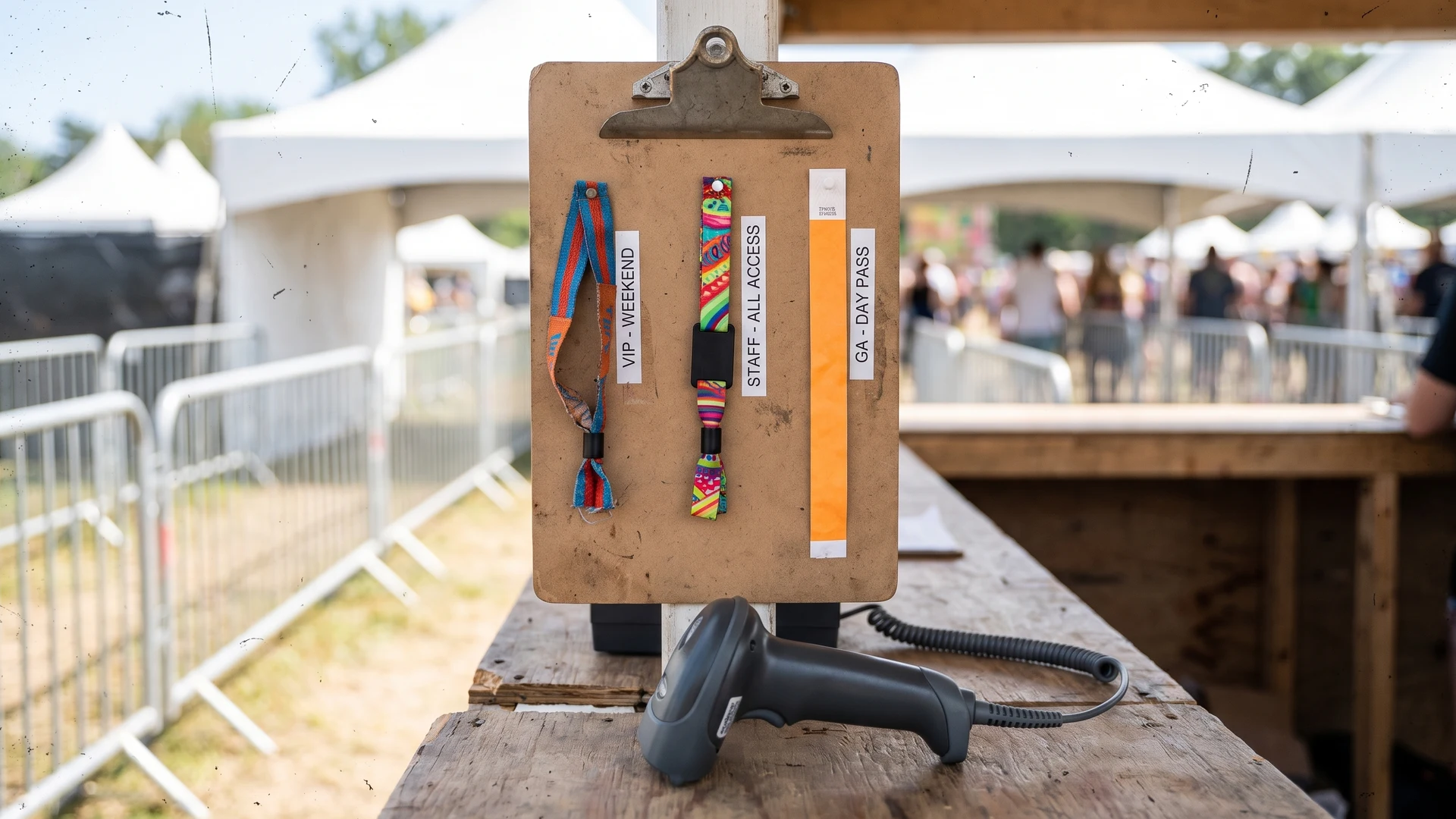
Creating physical reference displays at gates and bars gives your team a simple operational tool to confirm permissions quickly. A visual reference board should display an actual sample of every valid event wristband for that specific day or access tier. Pinning the physical material to the board allows new staff to compare a guest’s wristband directly against the approved example without relying solely on memory. This low-cost operational detail significantly reduces hesitation and keeps queues moving smoothly during peak arrival times.
You should place these boards at eye level inside ticket booths, at security checkpoints, and behind bar counters. Ensure the display clearly notes any specific security features, such as holographic stamps or sequential numbering sequences, that staff need to verify. Updating the boards daily for multi-day events ensures workers only accept the current day’s credentials, reducing the risk of access mistakes.
Guiding staff through common access and wristband problems
Even with a robust event wristband system, front line teams will inevitably encounter situations where a credential appears damaged, tampered with, or entirely invalid. How your staff handle these discrepancies determines whether an issue is resolved smoothly or escalates into a confrontation. Providing professionally neutral, confidence-building advice helps your team address these problems safely and consistently.
Assessing damaged or worn wristbands objectively
Multi-day events naturally subject event wristbands to wear and tear from weather, sleeping, and showering. Staff must learn to distinguish between a genuinely worn material and a closure that has been intentionally manipulated. Workers should assess the physical damage objectively by checking if the printed access details remain legible and whether the closure mechanism is still structurally sound.
If a guest presents a damaged event wristband that is still attached, staff should guide them to a designated customer service point for a replacement. Establishing a clear rule that damaged wristbands are only replaced when still on the wrist prevents attendees from handing broken bands to unauthorised individuals. This straightforward process protects your stock while offering a fair solution to the guest.
Identifying suspected transfers or counterfeits
While no wristband unconditionally prevents fraud or unauthorised access, training staff to spot inconsistencies severely limits misuse. Workers should look for clear signs of transfer, such as stretched adhesive, hidden knots, or snap locks that appear warped. If a wristband looks unusually loose or shows signs of tape and glue, the staff member should gently question the guest about the damage.
Counterfeit event wristbands often lack the specific physical weight, print quality, or secondary security features of the genuine article. If your team uses sequential numbering, staff can check if a suspicious wristband falls outside the issued number sequence. Equipping your workers with the knowledge to spot these subtle differences ensures they can confidently intercept invalid credentials at the gate.
Escalating complex issues professionally
Front line workers should never feel forced to handle aggressive disputes over access permissions alone. You must build clear escalation protocols that dictate exactly when a volunteer or gate staff member should call for a supervisor or security manager. Removing the guest from the main queue to discuss the problem at a dedicated resolution desk prevents bottlenecks and diffuses tension.
Supervisors can then investigate the discrepancy by checking digital ticket records or cross-referencing sequential numbers without holding up the rest of the attendees. They can issue a new event wristband if the record proves valid, or deny entry if the credential is confirmed as fraudulent. A calm, structured escalation process protects your staff, maintains the integrity of your access control system, and ensures that genuine ticketing mistakes are resolved fairly.
What is the quickest wristband check my team can run at the entrance?
Start with a three-step check. Confirm the event wristband colour and bold text match the guest’s access level. Scan the Quick Response (QR) code or barcode, or verify the serial if your process uses it. Finally, inspect the closure for tamper signs and run a gentle tug test.
How do we train volunteers to spot tampering on different closures?
Use hands-on practice with clear examples. Show Tyvek adhesive with security die-cuts, which are small pre-cuts that tear if lifted. Check plastic snap locks lie flat with no cracks. On fabric, the sliding bead must be tight, no fraying, and no movement during a tug test.
What should a wristband reference board include?
Build a simple reference board for every checkpoint. Include photos of valid event wristbands by access tier and day, close-ups of each closure type, the serial ranges in use, a note showing where any ultraviolet (UV) ink sits, and scannable test codes for staff practice.
Which tools help front line staff verify wristbands quickly?
Equip posts with the right tools for your system. An ultraviolet (UV) torch reveals UV ink. A barcode or Quick Response (QR) scanner, or an access app, validates printed codes. Radio Frequency Identification (RFID) or Near Field Communication (NFC) readers confirm smart wristbands. Keep laminated reference cards and spare lighting.
What should we do when a wristband looks cut, loose, or reattached?
Follow a calm secondary-check routine. Move the guest aside, then examine the closure for cuts, glue seams, knots, melted fibres, or fraying. Run a tug test. Verify permission by scanning the code or checking records. Escalate to a supervisor. Replace and log the serial if policy allows.